Report Fields: A Complete Reference Guide for All Reports
Summary
A comprehensive reference guide to all available fields across KnowledgeCity LMS reports. This article helps administrators understand what each field represents and how to use them when customizing report templates.
Introduction
When creating custom report templates, you have access to a wide range of fields that capture user data, course progress, licensing information, and more. This guide organizes all available fields by category, providing clear descriptions of what each field represents and when it appears in reports. Use this reference to select the right fields for your custom templates and understand the data you're viewing. For a complete overview of the Reports section, refer to Reports: An Overview of the Reports Section in LMS
How Fields Are Organized
Fields are grouped into categories based on the type of data they represent:
User Information Fields: Data about learners (profile, status, demographics).
Course Information Fields: Data about courses (titles, IDs, runtime, availability).
Course Progress Fields: Data about user engagement and completion.
Assignment Fields: Data about how and when courses were assigned.
License Fields: Data about licenses assigned to users.
Quiz & Question Bank Fields: Data about quiz attempts, questions, and answer patterns.
Feedback Fields: Data from course feedback and questionnaires.
Event Fields: Data about class course/ instructor-led events.
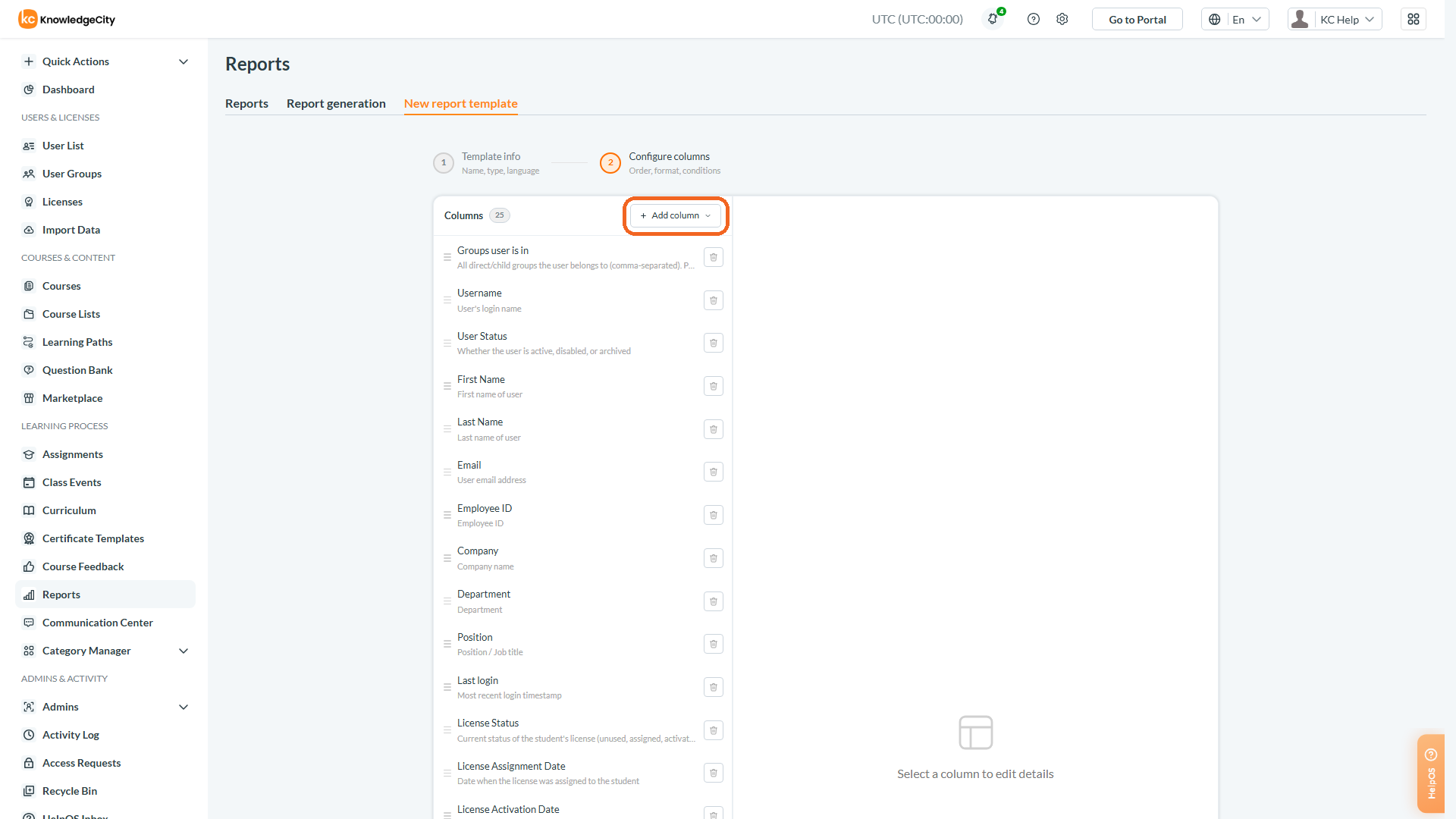
Selecting Fields in a Custom Report Template
Caption: When creating custom report templates, you have access to a wide range of fields that capture user data, course progress, licensing information, and more.
User Information Fields
Field Name
Description
Activated
Number of the student who has one or more licenses with status activated
Activation Date
Date when the user's account was activated
Activation Rate
Ratio of students with activated licenses to total number of students in group
Admin Status
Whether the user's LMS login is enabled or disabled
Center
Learning center or office location affiliated with the user
City
City associated with the user's location
Company
Name of the user's company or organization
Date of Birth
User's birth date
Deactivation Date
Date when the user's account was deactivated
Department
Department within the user's organization
Email
Primary email address associated with the account
Employee ID
Unique employee identification number, if configured
First Name
Learner's first name
Gender
Gender identity specified in the user profile
Group
The primary group name associated with the user
Groups
Names of groups the user belongs to
Language
Preferred language for portal display
Last Login Time
Timestamp of the user's most recent login
Last Name
Learner's surname
National Id
User's national identification number
Nationality
Nationality specified in the user profile
Not Active
Number of the student who has one or more licenses with status assigned and not have any licenses with status activated
Phone Number
Contact phone number
Position
Job title or position
Profile creation date
Date and time the user account was created
Student Groups
Names of all groups the student is assigned to
Time zone
Local time zone setting
User Archive Date
Date the user was archived; empty if the user has never been archived
User Archived by
Name of the admin who archived the user; empty when the user is not archived
User Name
The learner's unique login identifier
User status
Indicates whether the account is active or disabled
Course Information Fields
Field Name
Description
Course Availability
Current availability status (active or archived)
Course Creation Date
Date when the course was created in the LMS
Course Custom Fields
This will include all available course custom fields (if any) from the course detail page for the selected course(s)
Course ID
Unique identifier for the course within the portal
Course List Percentage
Ratio of the completed course progress for all courses of the assigned course list
Course Name
Official title or name of the course
Course status
Current progress status: Not Started, In Progress, Viewed, or Passed
Description
Detailed description of the course content
Name of the course list
Name of the course list that delivered the course
Runtime
Total duration of the course content
System Course ID
Internal system identifier for the course
Tagline
Short descriptive tagline for the course
Course Progress Fields
Field Name
Description
No. of started courses
Count of courses started but not yet completed
Begin
Date when the user started the course
Begin time
Time when the user began the course cycle
Certificate
Unique certificate number issued upon course completion
Completion Rate
Ratio of students who passed course to total number of students in group (Column will be duplicated for each course)
Date
Specific date or month when training activity occurred
Include previous course cycles
Option to include earlier attempts in the report
Not Completed
The number of students who not passed (viewed, started or not started) the course from the group (Column will be duplicated for each course)
Number of attends
Total number of times the user attended courses or events
Passed
Date when the user successfully passed the course
Passed time
Time when the user met the criteria to pass
Previous reset date
Date of the most recent cycle reset for the course
Progress
Current progress percentage within the course
Test Attempts
Number of certification test attempts for the course cycle
Total
Accumulated total (training hours, counts, etc.)
TRAINING HOURS
Total training hours accumulated by the user
Training duration
Student's training duration in the current learning cycle
Viewed
Indicator showing whether the user has viewed the course
Watched
Date when the user fully viewed all course content
Watched time
Time when the user completed viewing all course content
Assignment Fields
Field Name
Description
Actual Reset Date
Date the most recent reset was actually applied to the user's course cycle; empty for fresh cycles
Assigned
Indicates course assignment count
Assigned through
Indicates whether the course was assigned individually or through a user group
Assignment date
The date when the course, course list, or learning path was assigned or reassigned to the user
Assignment Source
How the course was assigned: Group-assigned, Individually-assigned, Self-enrolled, or Not-assigned
Availability End
Date when the course is no longer accessible
Availability Start
Date when the course became available to access
Due Date
Deadline for completing the learning path
Has Notification
Whether a notification is configured for the assignment: an active recurring reminder for the learning path, or an upcoming access or due date
Learning Path Access Closes
Date when access to the learning path closes
Learning Path Access Opens
Date when the user can start accessing the learning path
Learning Path Completion Date
Date the user completed the learning path, when the last course was passed
Learning Path Completion Percentage (%)
Percentage of courses in the learning path that the user has passed in the current cycle
Learning Path Name
Name of the learning path that delivered the course
Learning Path Start Date
Date the user started the learning path, when the first course was begun
Learning Path Status
Per-user status of the learning path: Passed, In Progress, or Not Started
Original assignment date
The date when the course, course list, or learning path was originally (initially) tied to the user
Parent Groups
Parent groups tree of child Group which the assignment was made through. If this column includes a few Parent Groups they will be split by "→"
Passed Due Date
Shows whether the learning path due date has passed; blank when the path is passed or no due date is set
Recurring Frequency
Recurring progress-reset frequency set on the learning path assignment, or the fixed reset date
Reset Reason
How the most recent reset happened: Manual when an admin reset the cycle, or Automatic when triggered by recurring settings or other system rules
License Fields
Field Name
Description
Expiration Date
Date when the license will expire
License Activation Date
Date when the license became active
License assigned date
Date when the license was assigned to the user
License expire date
Date when the user license will expire
License ID
Unique identifier for the user's assigned license
License Status
Current status: assigned, expired, or activated
Number of licenses
Total number of licenses assigned to the user
Subscription name
Name of the subscription associated with the license
Quiz & Question Bank Fields
Field Name
Description
# of appearance
how many times this question appeared in all quiz attempts
# of correct answers
how many times this question was answered correctly
# of incorrect answers
how many times this question was answered incorrectly
# of no answers
how many times this question was left without an answer
% of correct answers
Percentage of times the question was answered correctly
% of incorrect answers
Percentage of times the question was answered incorrectly
% of no answers
Percentage of attempts where the question was left unanswered
Answer
Response/ Text of the user's submitted answer
answer statistics
Detailed statistics summarizing all user responses
Category
Classification category of the quiz question
Is Correct
Indicates whether the user's answer was correct
most incorrect answer
The incorrect answer most commonly selected
Question
Question of course feedback
Question text
Text content of the quiz question
Questions
Multiple/ Each question within a questionnaire
Quiz begin date
Date when the user started the quiz attempt
Quiz end date
Date when the user completed the quiz attempt
Quiz result
Quiz Outcome: Passed or Not passed
Quiz score
Score achieved on the quiz attempt
Score
Score achieved on the quiz attempt or highest score across attempts
Feedback Fields
Field Name
Description
Answer
User's response to the feedback question
Count
The total number of answers to the question
Question
Question asked to gather feedback on course content
Questionnaire
Title or name of the feedback questionnaire
Event Fields
Field Name
Description
Access Request Date
Date when the user requested access to the class
End Date
Date when the event ends
Event Capacity
Max number of attendees
Event Date
Date of the event
Event Description
Description of the event
Event Duration
Duration of the event
Event End Date
Date and time when the class event ends
Event Instructor
Event instructor full name
Event Min Attendance
Minimum number of attendees for the event to take place
Event Published
Indicates whether event is published or not
Event Registration End
Date and time when registration to the event will close
Event Registration Start
Date and time when registration to the event will begin
Event Time
Time of the event
Event Type
Event type: webinar / in person
Request Approver Email
The email of the approver for the request (regardless of whether it is pending, approved, or rejected)
User Attendance Status
Whether the user has attended the event or not (attended / missed). Can be empty if the attendance is not set
User Registration Status
Status of the given user on the given event (pending / approved / rejected)
Important Notes
Field availability: Not all fields appear in every report type. Each report has its own set of default fields, and additional fields can be added when creating custom templates.
Field behavior: Some fields display data differently based on report configurations (e.g., Date field may show day or month depending on grouping options).
Time zones: Date and time fields reflect the time zone selected at report generation, not the user's individual time zone setting.
Conclusion
You have successfully explored all available report fields in KnowledgeCity LMS. Organized by category, this guide provides a clear reference for selecting the right fields when building custom report templates. Whether tracking user demographics, course progress, or quiz performance, understanding these fields ensures you capture exactly the data your organization requires.
We send anonymous usage data to our analytics provider to learn which help articles people need. Accepting also shares your approximate country, which the provider derives from your IP address. Decline and nothing about your visit is sent — we keep only basic page counts on our own servers. Privacy policy