





Summary
The SAP SuccessFactors integration allows KnowledgeCity to act as a content provider, while SAP SuccessFactors is the platform where learners launch training and track results.
It supports three core flows:
- Import users from SAP SuccessFactors into KnowledgeCity
- Export eligible courses from KnowledgeCity to SAP SuccessFactors
- Export course completions from KnowledgeCity to SAP SuccessFactors
Some sync operations can run automatically using a scheduler (based on the LMS local time zone).
Introduction
The purpose of this integration is to streamline enterprise learning operations by enabling admins to:
- Keep user accounts aligned between SAP SuccessFactors and KnowledgeCity
- Publish KnowledgeCity courses into SAP SuccessFactors for course launching
- Send completion data back to SAP SuccessFactors for centralized reporting and compliance
This reduces manual account management and keeps learning records consistent across systems.
Requirements
Before setting up the SAP SuccessFactors integration, confirm the following prerequisites:
Admin Permissions
- You must have Administrator access in the KnowledgeCity LMS to enable and configure integrations.
SAP SuccessFactors API Access
You must obtain the required API details from your SAP SuccessFactors administrator, such as:
- API Key (or authentication credential)
- API Base URL
- Company ID
- Admin User ID
- Provider ID (content provider identifier in SuccessFactors)
KnowledgeCity API Access
- You must have a valid KnowledgeCity API secret/token created in the LMS (or provided by a KnowledgeCity admin).
Data Mapping Readiness
For user import and identity matching:
- Ensure the attribute you plan to use as the KnowledgeCity username exists consistently in SAP SuccessFactors (for example: email or employee identifier).
Scheduling (Optional)
- If you plan to use scheduled sync, confirm the schedule aligns with your internal data update cadence and reporting needs.
Steps to Follow
1) Enable the SAP SuccessFactors Integration
- Log in to the KnowledgeCity LMS as an Administrator.
- Go to the Integrations page.
- Find the SAP SuccessFactors integration card.
- Click Enable.
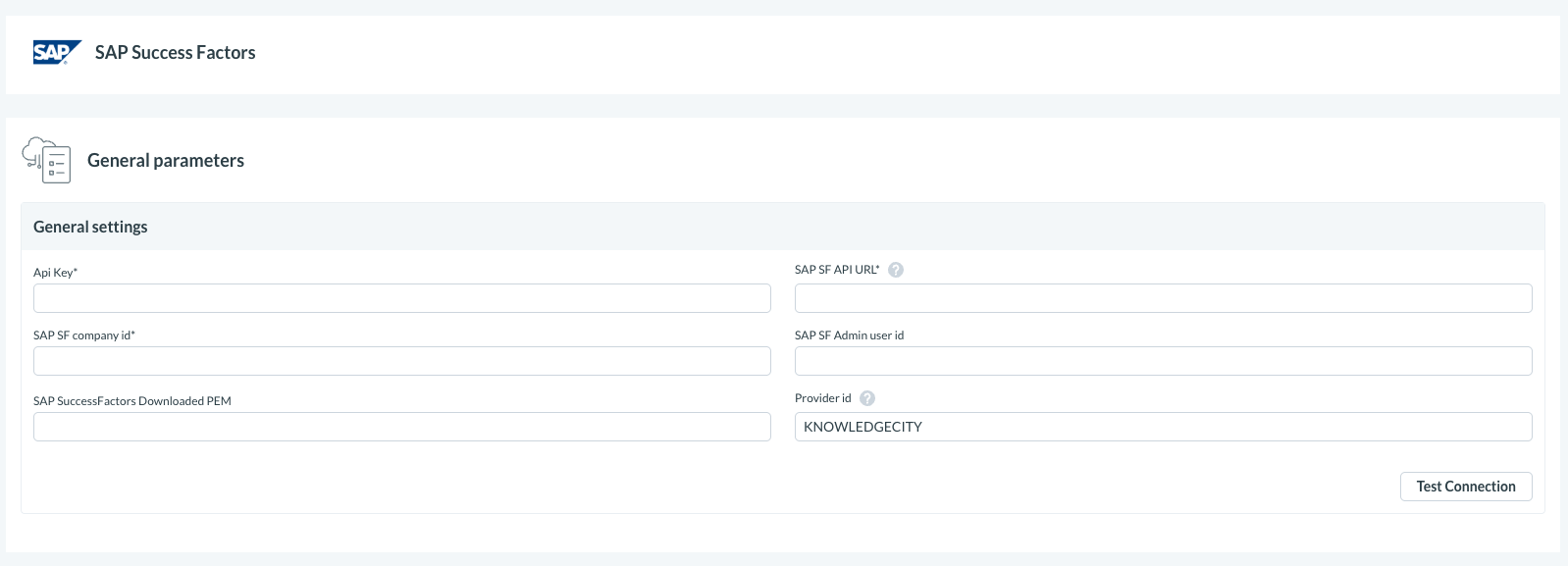
2) Configure General Settings
Fill in the general connection settings using values provided by your SAP SuccessFactors administrator:
- SAP SuccessFactors API Key
- SAP SuccessFactors API URL
- SAP SuccessFactors Company ID
- SAP SuccessFactors Admin User ID
- Provider ID
- KnowledgeCity API Secret
- KnowledgeCity API URL
Save your changes.
3) Configure User Import Settings (Optional)
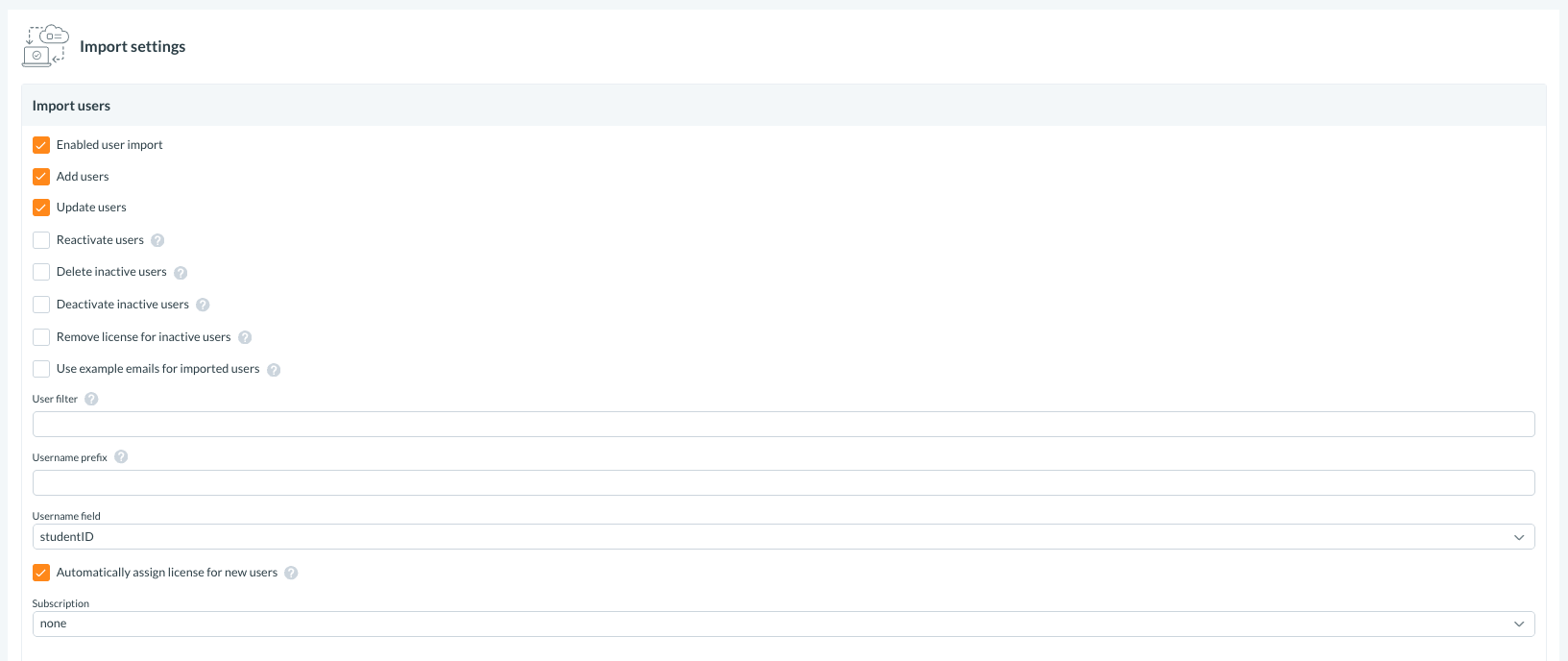
If you want SAP SuccessFactors to be the source of truth for users, configure user import options such as:
- Enable user import
- Add users (create new users in KnowledgeCity)
- Update users (update existing user attributes when active in both systems)
- Reactivate users (reactivate users if they become active again in SAP SuccessFactors)
- Deactivate inactive users (deactivate users in KnowledgeCity if inactive in SAP SuccessFactors)
- Remove license for inactive users (optional license management)
Additional configuration:
- User filter (limits which users are imported, based on SuccessFactors query rules)
- Username field (select which SuccessFactors field is used as the KnowledgeCity username)
- Username prefix (optional, avoids collisions)
- Automatically assign license for new users + Subscription (license assignment behavior)
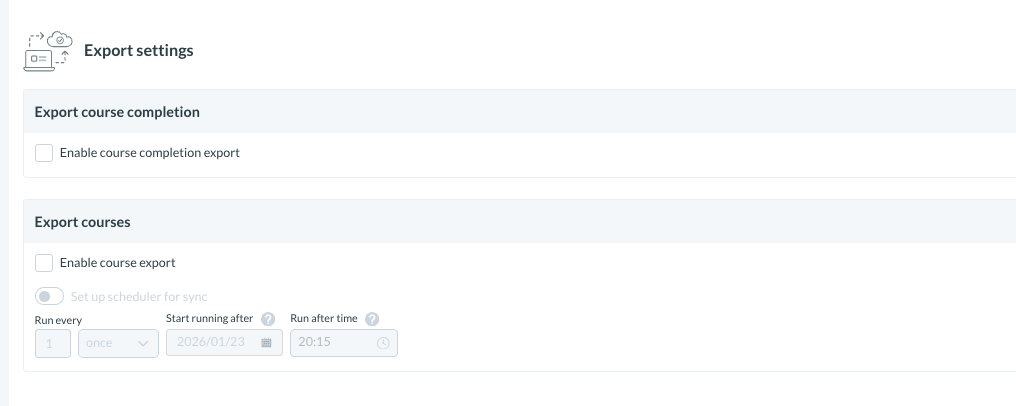
4) Configure Course Export (Optional)To export courses from KnowledgeCity into SAP SuccessFactors:
- Enable course export
- Ensure your courses meet export requirements (see “Expected Result” for criteria)
5) Configure Course Completion Export (Optional)
To report learning completions back to SAP SuccessFactors:
- Enable course completion export
When enabled, completions are typically sent after the learner finishes a course.
6) Configure Scheduler (Optional)
If available in your portal, configure a scheduler to run import/export operations automatically.
- Scheduled tasks follow the LMS local time zone.
Expected Result
Successful Connection and Sync
- Integration is enabled and credentials are validated.
- User import (if enabled) syncs users from SAP SuccessFactors into KnowledgeCity based on your filter and update rules.
Course Export (if enabled)
- Courses become available to SAP SuccessFactors based on eligibility rules, typically including:
- Course is active
- Course is within visible categories
- Parent categories are also visible
Completion Export (if enabled)
- Completion records are sent to SAP SuccessFactors after the learner completes a course.
- SAP SuccessFactors reporting reflects updated completion status and completion metadata based on what your configuration supports.
Troubleshooting
| Problem | Cause | Solution |
|---|---|---|
| Integration fails to connect / credentials rejected | Incorrect API key, URL, company ID, admin user ID, provider ID, or KC API secret | Re-check values with your SAP SuccessFactors admin and confirm the KC API secret is active and valid. |
| Users are not importing | User import disabled, user filter too restrictive, or mismatch in username field | Enable user import, loosen/validate the filter, and confirm the selected username field matches what exists in SAP SuccessFactors. |
| Users import but do not receive licenses | Auto-license assignment disabled or subscription not configured | Enable automatic license assignment and select a subscription for new users. |
| Users not updated/reactivated/deactivated as expected | Update/reactivation/deactivation rules not enabled | Review and enable the specific user status rules you want applied during sync. |
| Courses are not exported | Course export disabled, course inactive, or category visibility rules not met | Enable course export, ensure courses are active, and confirm category visibility (including parent categories). |
| Completions are not appearing in SAP SuccessFactors | Completion export disabled or mapping/reporting expectation mismatch | Enable completion export and confirm SAP SuccessFactors is set up to accept and display completion data for the provider. |
| Sync does not run on schedule | Scheduler disabled or configured at unexpected times | Enable scheduler and verify the schedule in LMS local time zone. |