





Summary
Anonymous Incident Reporting lets you submit a workplace incident through the Safety App reporting wizard without attaching your identity to the submission. You make this choice in the wizard's first step, the report-mode step, before entering the incident details. When you report anonymously, your identity is not recorded on the incident.
Introduction
The Safety App incident reporting wizard walks you through a series of guided steps to capture a workplace event such as an injury, near miss, or property damage. Its very first step lets you choose a report mode: submit the report attributed with your name, or submit it anonymously so that sensitive observations can surface without your identity being attached.
Anonymous reporting is used by anyone who needs to raise an incident but prefers not to have it associated with them, and it is especially valuable for field workers who reach the reporter portal from a phone, tablet, or kiosk. It solves a common safety-program problem: people sometimes hesitate to report hazards or sensitive observations when their name is attached, and anonymous reporting removes that barrier so important events still get recorded.
Key Concepts
- Report mode: The choice you make in the wizard's first step between submitting attributed (with your identity) or anonymously.
- Anonymous submission: When chosen, the incident is not attributed to you; the reporter identity on the record is left empty rather than linked to your account.
- Account-level permission: Anonymous reporting is governed by an account setting that allows anonymous reports. If your organization has this turned off, a report you mark anonymous is submitted as attributed instead.
- No reporter confirmation email: Because there is no identified reporter to notify, the confirmation email that a reporter would normally receive is not sent for an anonymous report.
- First-class record: An anonymous report is still a complete incident record with its category, description, affected persons, and evidence; only the reporter's identity is withheld.
Steps to Follow
Open the reporting wizard
You reach the reporting wizard from the reporter portal, which you can open on a phone, tablet, or kiosk. Start a new submission to begin the guided steps.
Choose the anonymous report mode
On the first step of the wizard, the report mode step, choose to submit anonymously rather than with your identity attached. Select this option when you prefer that the report not be associated with you, or when a sensitive observation needs to surface without your name on it.
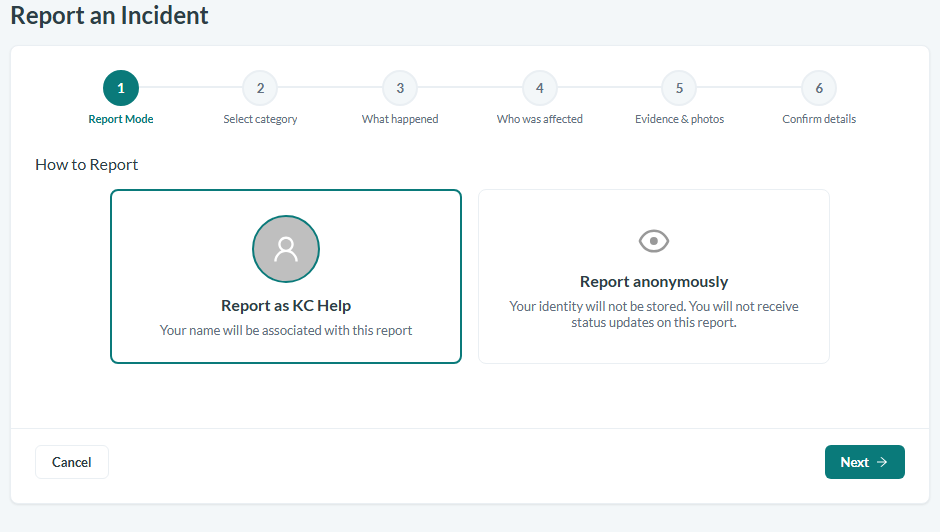
Caption: The report mode step: choose Report anonymously instead of the identified option to keep your name off the record.
Continue through the remaining steps
After setting the report mode, continue through the rest of the wizard as usual to select the incident category, describe what happened, record who was affected, and attach any supporting evidence. Your report mode choice stays in effect for the whole submission.
Submit the report
Review the details and submit the report. When the account allows anonymous reports, the incident is saved with no reporter identity attached to it. Because there is no identified reporter, you will not receive a reporter confirmation email for an anonymous submission.
Know what your account allows
Anonymous reporting depends on an account-level setting that permits anonymous reports. If your organization has this setting disabled, choosing anonymous will not take effect and the report will instead be submitted attributed to you. If you are unsure whether anonymous reporting is enabled, check with your Safety administrator.
Conclusion
Anonymous Incident Reporting gives you a straightforward way to raise workplace incidents without tying your identity to the submission, encouraging people to report hazards and sensitive observations they might otherwise hold back. By choosing the anonymous option in the wizard's report-mode step, and provided your account permits anonymous reports, you can document what happened as a full incident record while keeping your identity off of it.