





Summary
Organizational units are how Safety App models your company as a hierarchy, from the company at the top down through business units, sites, and departments. This structure controls what each user can see and drives how incidents, investigations, and reports are routed, filtered, and grouped. Setting it up correctly is the foundation for scaling a safety program across a large organization.
Introduction
Organizational units are the way enterprise safety scales in Safety App. Instead of managing every worker and record in one flat list, you arrange your organization as a tree so that visibility and reporting can follow that structure automatically.
This feature is used by safety administrators and program owners who need to reflect a real company structure inside Safety App. By building the hierarchy once, you give every user the right scope of access and make sure that incidents, investigations, and reports line up with the parts of the organization they belong to.
Key Concepts
- Organizational unit: A node in your company hierarchy. Org units are arranged as a tree, with a company at the top, business units beneath it, sites beneath those, and departments inside each site.
- Hierarchy levels: The standard levels are company, business unit, site, and department. Each level nests inside the one above it, so a department sits inside a site, and a site sits inside a business unit.
- User membership: Users belong to one or more org units. A user can be placed in more than one part of the tree when their responsibilities span multiple areas.
- Visibility follows the tree: A user's visibility into incidents, investigations, and reports follows the org unit tree. What a user can see is determined by where they sit in the hierarchy.
- Location: Locations sit alongside org units. Every incident, certification, and worker carries a location, which works together with the org unit structure.
- Reporting dimensions: Reports can be grouped by location, by department, or by business unit, so the same data can be viewed at different levels of the organization.
- Multitenancy: The hierarchy rests on a multitenant foundation, where one company owns its own structure and records within Safety App.
Steps to Follow
Plan your hierarchy
Before building anything, map out how your organization is structured. Decide which business units sit under the company, which sites belong to each business unit, and which departments operate inside each site. A clear plan up front keeps the tree accurate and makes visibility predictable later.
Build the org unit tree
Create your org units to match the plan, starting from the top. Place the company at the top, then add business units beneath it, add sites beneath the business units, and add departments inside each site. Because each level nests inside the one above it, build them in order so every unit has its correct parent.
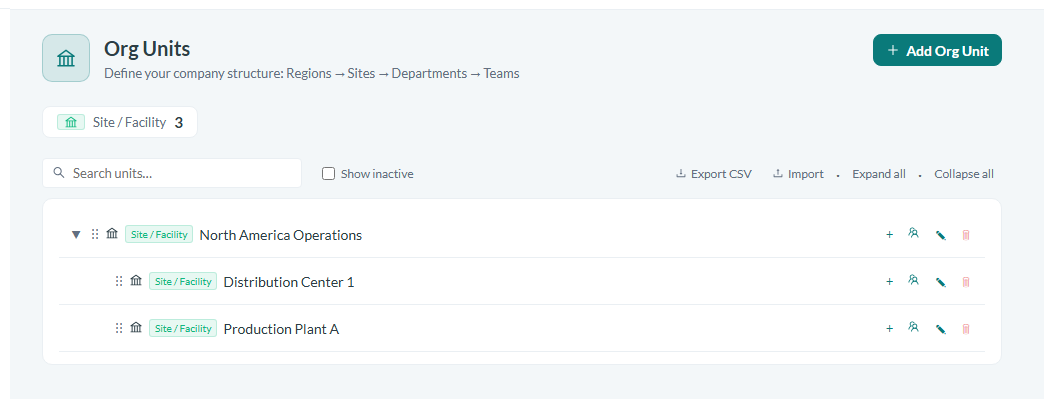
Caption: Create your org units to match the plan, starting from the top.
Assign users to org units
Place each user into the org unit or units they belong to. Users can belong to one or more org units, so assign someone to multiple parts of the tree when their role spans several areas. A user's position in the hierarchy is what determines their visibility into incidents, investigations, and reports.
Set locations alongside org units
Make sure locations are in place, since they sit alongside the org unit structure. Every incident, certification, and worker carries a location, so having your locations defined lets records be tagged correctly and lets location work together with the org unit tree.
Use the hierarchy for reporting and filtering
With the structure in place, use it to group and filter your data. Reports can be grouped by location, by department, or by business unit, letting you view the same safety data at whichever level of the organization you need, from a single site up to an entire business unit.
Conclusion
A well built organizational unit hierarchy is the backbone of a scalable safety program in Safety App. By planning the tree, building it from the company down to individual departments, assigning users to the right units, and keeping locations in place, you ensure that visibility, routing, filtering, and reporting all follow your real organization structure.