





Summary
Recordability Decisions let you capture the OSHA recordability determination for a workplace incident from the incident's Compliance tab in the Safety App. A step-by-step recordability test walks you through the determination and records the supporting details, and the resulting decision feeds your OSHA logs. Every decision is audit-logged when it is created or updated.
Introduction
A Recordability Decision is the record of whether a reported incident is OSHA-recordable and what its regulatory details are. It lives on the Compliance tab of an incident, which flags OSHA recordability and tracks the associated regulatory clock. This is where you formally close out the question of "does this incident belong on our OSHA logs, and how should it be classified?"
Safety and compliance staff who review incidents use this feature to make and maintain consistent, defensible determinations. By capturing the decision alongside its supporting fields in one place, it solves the problem of scattered or undocumented recordability calls and provides the source data that drives your OSHA logs.
Key Concepts
- Recordability decision: The determination of whether an incident is OSHA-recordable, stored per incident and used to drive your OSHA logs.
- Compliance tab: The area of an incident where OSHA recordability is flagged and the regulatory clock is tracked; it is where you make and view the decision.
- Recordability test: A guided, step-by-step wizard within the Compliance tab that walks you through the recordability determination one part at a time.
- OSHA 301 fields: The set of case-detail fields captured with the decision to support OSHA reporting for the incident.
- Days away count: The number of days the affected person was away from work; this value is capped at
180days in line with OSHA rules. - Days restricted count: The number of days of restricted work or job transfer; this value is also capped at
180days. - Audit logging: Creating or updating a decision is recorded in the incident's audit trail, so every change is attributable and traceable.
Steps to Follow
Open the incident's Compliance tab
From the incident you are reviewing, go to the Compliance tab. This tab flags whether OSHA recordability applies and surfaces the regulatory clock for the incident, and it is where the recordability decision is created and maintained.
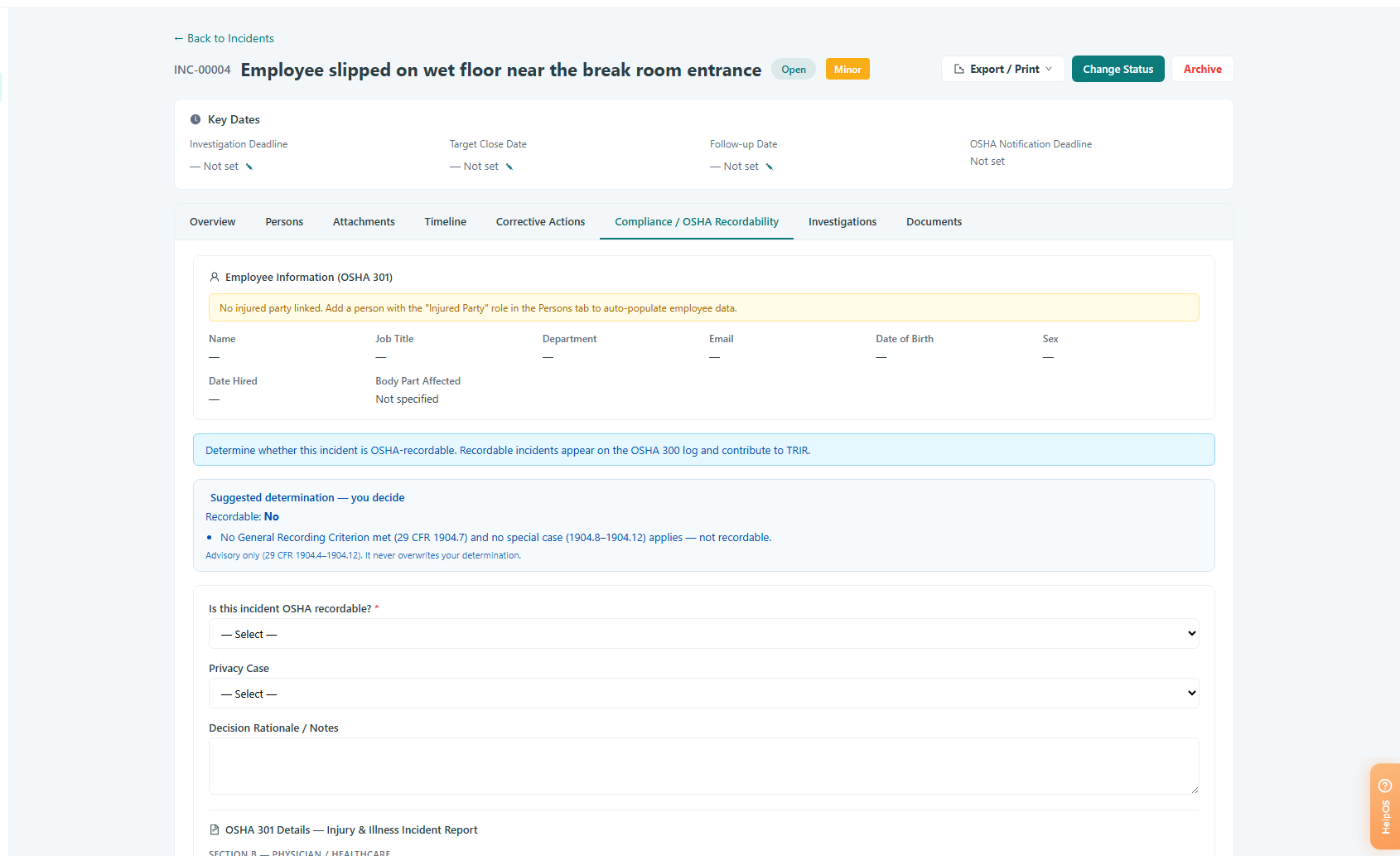
Caption: From the incident you are reviewing, go to the Compliance tab.
Work through the recordability test
Use the guided recordability test on the Compliance tab to walk through the determination step by step. The wizard takes you through the recordability question in order so that you do not miss part of the evaluation, and it captures your determination for the incident.
Enter the OSHA 301 case details
As part of the decision, complete the OSHA 301 case-detail fields for the incident. These fields hold the supporting information needed for OSHA reporting and are stored together with the recordability determination.
Record days away and restricted days
Where the case involves lost or restricted time, enter the days away count and the days restricted count. Each of these is capped at 180 days to match OSHA limits, so a larger value you enter is clamped to 180 when the decision is saved.
Save the decision
Save the recordability decision to store it against the incident. The first save creates the decision; returning later to change any field updates it. Both actions are written to the incident's audit trail, so the creation and any later edits remain traceable.
Review or update later
You can return to the Compliance tab at any time to review the existing decision for the incident or to update its fields. Updates track the changes to the decision, including the OSHA 301 fields and the day counts, and are logged just like the original decision.
Conclusion
Recordability Decisions give your team a single, guided place to determine whether an incident is OSHA-recordable, capture the supporting OSHA 301 details and day counts, and keep a full audit trail of the call. Because these decisions drive your OSHA logs, recording them accurately on the Compliance tab keeps your regulatory reporting consistent and defensible.