





Summary
Certification Tracking in the Safety App lets you record certifications along with their expiry dates and receive automatic recertification alerts before they lapse. It gives teams a single place to see which certifications are current, which are approaching expiry, and which need to be renewed. This helps organizations stay compliant and avoid gaps in required qualifications.
Introduction
Certification Tracking is a Safety App feature that keeps a record of the certifications held across your organization and monitors when each one is due to expire. It is used by safety and compliance administrators who need to ensure that required qualifications remain valid, as well as by managers and individual holders who are responsible for keeping their certifications up to date.
The problem it solves is simple but critical: certifications lapse quietly. Without a system in place, an expired qualification is often discovered only after it has already caused a compliance gap. By storing expiry dates and issuing recertification alerts ahead of time, this feature turns renewals into a proactive, scheduled task rather than a last-minute scramble.
Key Concepts
- Certification: A qualification or credential recorded in the Safety App, representing a competency or clearance that must remain valid over time.
- Expiry date: The date a certification is no longer valid. This date drives when the system considers a certification current, expiring, or lapsed.
- Recertification: The process of renewing a certification before or after its expiry date so that the holder remains qualified.
- Auto-recertification alert: An automatic notification generated ahead of an expiry date to prompt renewal before the certification lapses.
- Alert timing: The window before expiry during which alerts are sent, so that recipients have enough lead time to complete renewal.
- Certification status: The current state of a certification derived from its expiry date, such as valid, approaching expiry, or expired.
Steps to Follow
Add a certification and its expiry date
Open the Certification Tracking area of the Safety App and add a certification record. Enter the certification details and set its expiry date. The expiry date is the key field the system uses to calculate status and to schedule recertification alerts, so make sure it reflects the actual date the certification lapses.
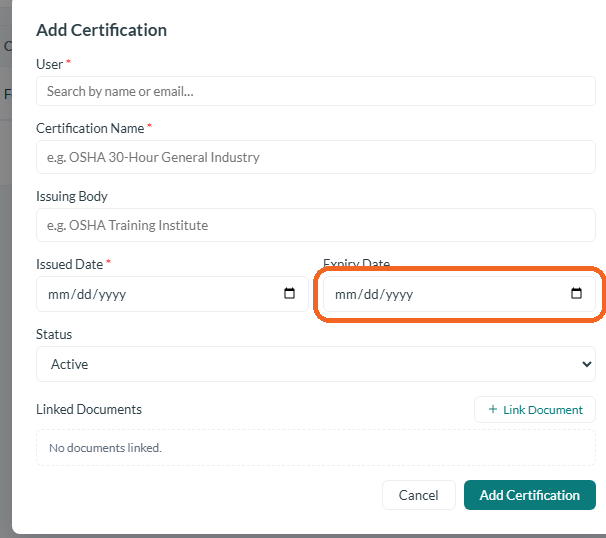
Caption: Open the Certification Tracking area of the Safety App and add a certification record.
Review certification status
Use the tracking view to see the certifications on record and their current status relative to their expiry dates. This lets you quickly identify which certifications are valid, which are approaching expiry, and which have already lapsed, so you can prioritize renewals.

Caption: Use the tracking view to see the certifications on record and their current status relative to their expiry dates.
Receive auto-recertification alerts
Before a certification reaches its expiry date, the system automatically issues a recertification alert. These alerts are intended to give you lead time to begin the renewal process before the certification lapses, so you do not have to manually watch each expiry date.
Act on an alert and recertify
When you receive a recertification alert, follow your organization's renewal process to complete recertification. After the certification is renewed, update its record with the new expiry date so the tracking view reflects the current status and future alerts are scheduled from the new date.
Conclusion
Certification Tracking helps your organization keep required qualifications valid by recording expiry dates and sending recertification alerts before certifications lapse. By keeping expiry dates accurate and acting on alerts promptly, you can maintain compliance and prevent avoidable gaps in your team's certifications.