





Summary
Investigation notes let you record internal observations, context, and running commentary while an investigation is underway in Safety App. Notes are tied to a specific investigation and attributed to the person who wrote them, so the investigation team keeps a clear, shared record of what was seen and considered. Use them to capture details as work progresses rather than relying on memory.
Introduction
An investigation note is a short internal entry attached to an investigation in Safety App. It gives the people working on that investigation a place to write down observations, follow-up thoughts, and context that supports the investigation as it moves forward.
Notes are used by the people involved in the investigation process, including the lead investigator and the team members supporting the investigation. Because a note records who wrote it and when, the team can look back and understand not just what was decided but how the thinking developed along the way.
Key Concepts
- Investigation note: an internal entry recording an observation or piece of context tied to a single investigation.
- Investigation: the case record that the note belongs to, linked to a reported incident and owned by a lead investigator.
- Lead investigator: the person who owns the investigation and typically records key observations as notes.
- Team member: someone supporting the investigation who can contribute notes in their role.
- Author attribution: each note is associated with the logged-in user who created it, so authorship is clear.
- Internal visibility: notes are for the investigation team's own use, not for external reporting.
Steps to Follow
Open the investigation
Sign in to Safety App and open the investigation you want to work on. You can reach your active investigations from your personal dashboard, where the investigations you lead and the teams you belong to are listed. Confirm you are on the correct investigation before adding any notes.
Go to the notes area of the investigation
Within the open investigation, move to the Notes area for that investigation. This is where existing notes for the investigation are shown together and where you add new entries.
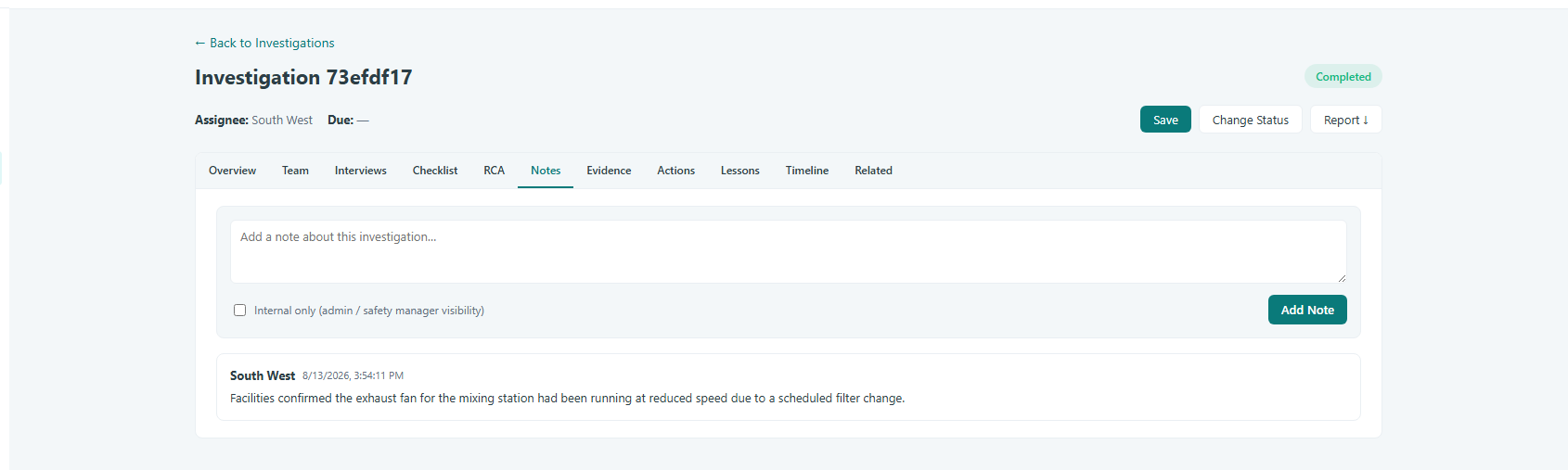
Caption: Within the open investigation, move to the Notes area for that investigation.
Write your note
Enter your observation or comment as the note text. Keep each note focused on a single observation or update so the record stays easy to scan. Because notes are internal to the investigation team, write plainly and include the context a teammate would need to understand the entry later.
Save the note
Save the note to attach it to the investigation. Once saved, the note is recorded against the investigation and attributed to you as the author, so the team can see who added it and when.
Review notes as the investigation progresses
Return to the Notes area whenever you need to review what has been captured. Reading through the notes gives you and the rest of the team a running account of the observations made during the investigation.
Conclusion
Adding notes keeps the important observations from an investigation in one shared, attributed place in Safety App. By capturing context as the work happens and reviewing it as the investigation progresses, the team maintains a clear record that supports sound decisions from start to finish.