





Summary
Every investigation carries a target completion date derived from the severity of the incident behind it. The Safety App shows how each investigation stands against that target in three places: a status banner on the investigation itself, a due date column with an overdue filter on the investigations list, and organization-level figures on the dashboard. This article covers reading those indicators, adjusting a due date when there is a legitimate reason, and using the dashboard view to spot problems that affect more than one case.
Introduction
Investigations rarely fail because someone decided to stop. They stall: a witness is on leave, an analysis is outstanding, attention moves to the next event. Without a visible deadline, a stalled investigation looks the same as an active one, and the ones that quietly overrun are often the serious ones that mattered most.
SLA tracking makes that visible. Safety Managers use it to manage their own caseload, and Admins and Super Admins use it to see across the whole program. The setting up of SLA durations is a separate task for a Super Admin; this article is about working with the results day to day.
Key Concepts
- SLA: the target window within which an investigation should be completed, applied automatically according to the severity of the linked incident. Your account's Super Admin defines these windows per severity level.
- Due Date: the specific date the investigation is expected to be completed by, calculated from the SLA when the investigation is created and shown on the investigation itself.
- SLA status: the current standing of an investigation against its due date, shown as a colour-coded banner that also states how much time is left or how far past the date it has gone.
- Overdue: an investigation whose due date has passed while it is still open. Overdue cases are highlighted in the list and counted on the dashboard.
- Overdue Only: a filter on the investigations list that narrows it to overdue cases, so a daily review can start with the ones that need attention now.
- SLA compliance: the organization-level measure of how many investigations were completed within their target window, broken down by severity.
Steps to Follow
Reading the SLA banner on an investigation
Open any investigation and look at the banner near the top of its Overview. It is colour-coded and moves through three states as time passes.
Green means the investigation is on track, with a meaningful amount of its window still remaining, and the banner states how much time is left. Amber means the deadline is approaching: this appears once less than a quarter of the window remains, and the banner counts down more precisely as the date nears. Red means the due date has passed and states how far overdue the investigation has become.
When the investigation reaches its completed state, the clock stops and the banner reflects that the work finished rather than continuing to count. The Due Date field on the same view shows the absolute calendar date behind whatever the banner is saying.
Watching your caseload from the investigations list
The investigations list carries an SLA Due Date column, so you can scan target dates without opening each case. Anything past due is marked with an overdue indicator showing how many days it has run over.
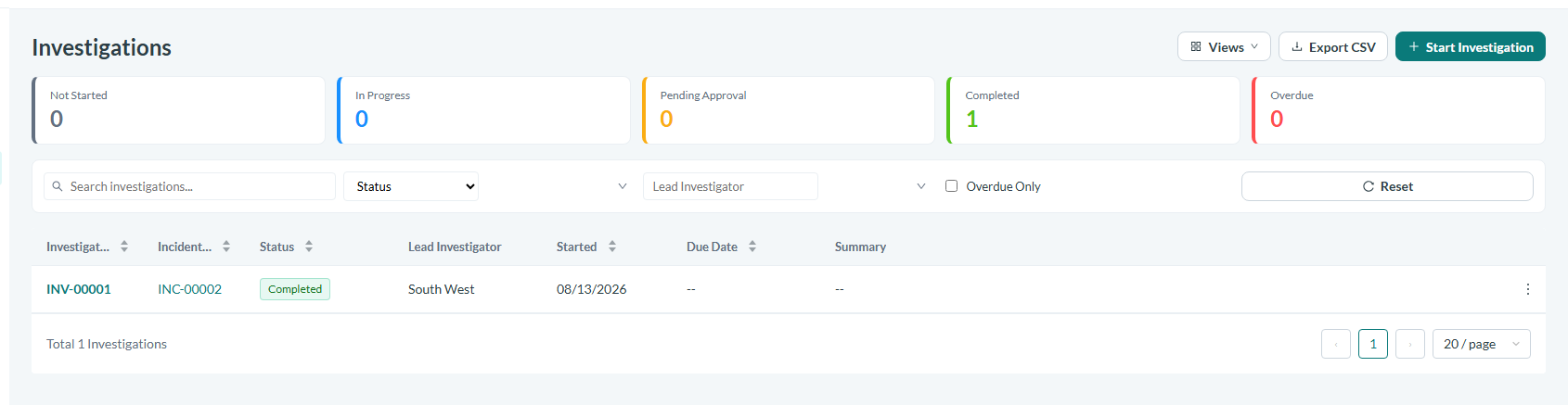
Caption: The investigations list, with the SLA due date column and the Overdue Only filter.
For a daily review, use the Overdue Only filter in the filter bar. It reduces the list to just the cases that have passed their date, which is the fastest way to start a morning with the work that is genuinely late rather than reading the whole list.
Understanding when the clock pauses
An investigation that has been submitted for approval is waiting on someone else. While it sits in that state its SLA clock is paused, and it resumes if the investigation is returned for revision. This means the investigation team is not penalized for time spent waiting on approvers, and it also means an investigation sitting with an approver will not start accumulating overdue days on the team's behalf.
Adjusting a due date when the reason is genuine
Some investigations legitimately need more time. A key witness may be unavailable, specialist analysis may be outstanding, or new evidence may have widened the scope well beyond what was first understood. In those cases the due date can be changed from the investigation's overview, and the SLA status recalculates immediately against the new date.
Treat this as a deliberate act rather than routine housekeeping. Adjustments are visible to approvers and to senior management, and an investigation whose date has been moved several times tells a story of its own. Where the delay is caused by something outside the team's control, say so at the time, because an extension with a clear reason is defensible and an unexplained one is not.
Reviewing SLA health across the organization
The Investigations section of the dashboard shows the position across every case rather than one at a time. An Overdue Investigations figure gives the current count, and an SLA Compliance by Severity table shows, for each severity level, how many investigations were completed inside their window against how many ran over.
Read this as a signal about the process rather than about individuals. A single overdue case is a case to chase. A severity level that is consistently overdue usually means something structural: too few investigators for the volume, a target that was set tighter than the work realistically allows, or a step in the process that reliably takes longer than expected. If that pattern appears, take it to your Super Admin, since the target itself may be the thing that needs changing.
Conclusion
SLA tracking answers two different questions with the same data. On a single investigation, the banner and due date tell you whether this case is on schedule and how much room is left. Across the program, the overdue count and the compliance breakdown by severity tell you whether your targets and your capacity are matched. Use the overdue filter to keep the daily list honest, adjust due dates only for reasons you would be comfortable explaining, and treat a repeatedly overdue severity level as a question about the process rather than about the people working it.