





Summary
Investigation SLAs and Templates let your Safety team standardize how incident investigations are run. Severity-based SLAs automatically calculate a due date for each investigation, while reusable templates supply predefined checklist items, interview prompts, root cause analysis methods, and team roles so every investigation follows a consistent workflow.
Introduction
When incidents are investigated ad hoc, due dates and investigation quality can vary widely from one case to the next. The Investigation SLAs and Templates feature addresses this by tying an investigation's timeline to its severity and by providing reusable templates that structure the work involved.
This feature is used by safety managers and investigators who need investigations to complete within predictable timeframes and to follow a repeatable process. SLAs keep timelines accountable and support escalation when needed, and templates ensure that recurring investigation steps are not overlooked.
Key Concepts
- Severity level: Each investigation carries a severity level. This value drives how much time is allotted before the investigation is due.
- SLA configuration: Your account defines, per severity level, the number of SLA hours allowed for an investigation to be completed. This mapping is what turns a severity into a concrete timeframe.
- SLA hours: The number of hours associated with a severity level. When an investigation is created or updated, the applicable SLA hours are recorded on the investigation itself.
- Due date: The deadline calculated for an investigation from its SLA hours. The due date is stored on the investigation so the team can track it directly.
- Escalation: An investigation can be marked as escalated, and the time at which escalation occurred is recorded for follow-up and reporting.
- Investigation template: A reusable definition of standard investigation content, including checklist items, suggested interviews, default root cause analysis methods, and default team roles.
- Checklist items: Predefined steps in a template, each with descriptive text and a flag indicating whether the item is required.
- Suggested interviews and defaults: Templates also carry suggested interviews (an interviewee type and description), default RCA methods, and default team roles to guide the investigation.
Steps to Follow
Configure severity-based SLAs
Set up how long investigations are allowed to take for each severity level. For every severity level your account uses, define the corresponding SLA hours. This mapping becomes the basis for calculating due dates on new investigations.
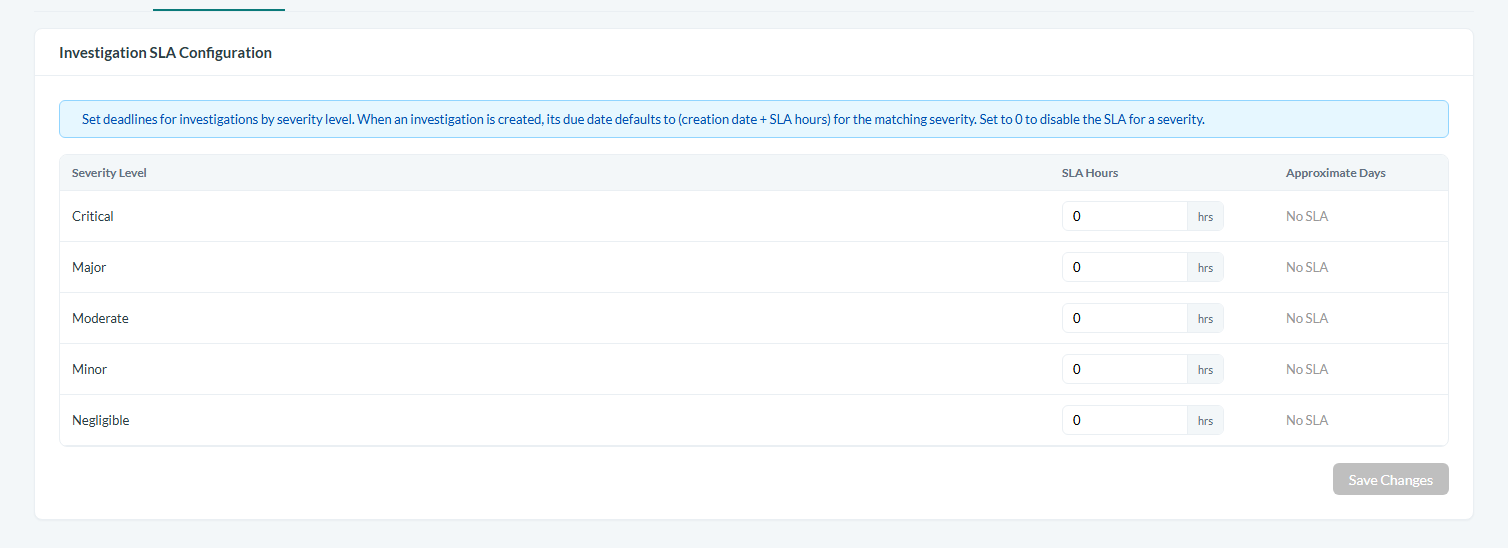
Caption: Set up how long investigations are allowed to take for each severity level.
Let the due date calculate automatically
When you create or update an investigation, its due date is derived from the SLA hours tied to the investigation's severity level. You do not need to compute the deadline manually. The applicable SLA hours and the resulting due date are recorded on the investigation so the team can see the deadline at a glance.
Track progress against the SLA
As the investigation proceeds, monitor its due date to keep the work on schedule. Because the due date is stored on the investigation, it is available for tracking and reporting alongside the rest of the case details.
Escalate when needed
If an investigation needs additional attention or is at risk of missing its deadline, mark it as escalated. The time of escalation is recorded, giving you a reference point for follow-up and for reviewing how escalations were handled.
Build a reusable investigation template
Create an investigation template to standardize recurring work. In the template, define:
- Checklist items: the steps to complete, each with descriptive text and a required flag for mandatory items.
- Suggested interviews: predefined interview prompts, each with an interviewee type and a description.
- Default RCA methods: the standard root cause analysis methods that should be applied.
- Default team roles: the roles that make up the investigation team by default.
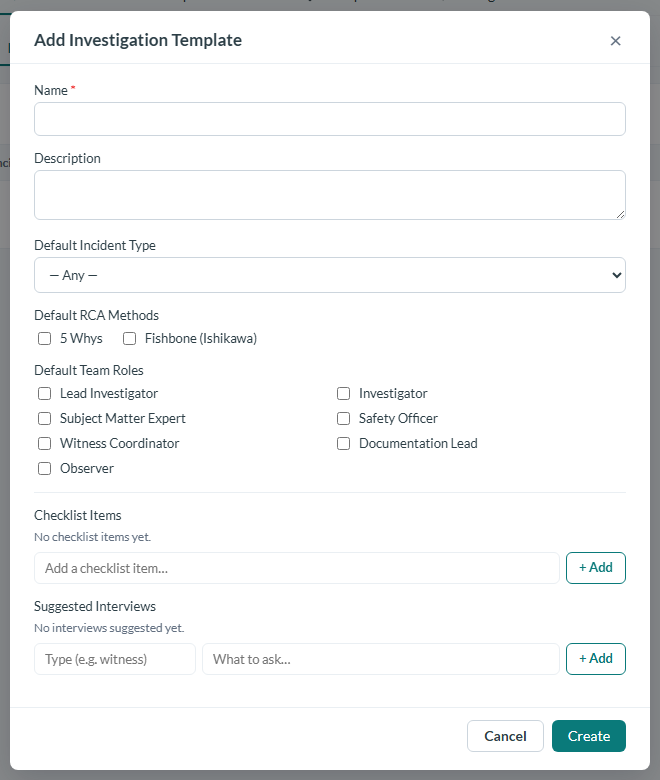
Caption: Create an investigation template to standardize recurring work.
Apply the template to investigations
Use your template so that new investigations start with the standardized checklist, suggested interviews, default RCA methods, and default team roles already in place. This keeps every investigation aligned to the same repeatable workflow, reducing the chance that a required step is missed.
Conclusion
By combining severity-based SLAs with reusable investigation templates, your Safety team gains both accountable timelines and a consistent investigation process. SLAs ensure each case has a clear, automatically calculated due date with support for escalation, while templates keep the investigation steps standardized across your organization.