





Summary
The investigation team is the group of people assigned to work on a single safety investigation in Safety App. Managing the team means naming a lead investigator and adding team members, then defining the role each person plays. This keeps responsibility clear and ties everyone's work to one investigation record.
Introduction
Every investigation in Safety App has a team behind it. The team is managed from the Team area of an investigation's detail page, where you assign the lead investigator and the other members who will contribute to the case.
Lead investigators use this feature to build out their team, while team members rely on it to understand what role they hold on a given investigation. Because each assignment is tied to the investigation record, the team roster and its roles stay visible to everyone involved and feed into personal views such as the My Investigations dashboard.
Key Concepts
- Lead Investigator: The person who owns and drives the investigation. The lead investigator is shown at the top of the investigation and is the primary point of accountability for the case.
- Team member: Anyone assigned to the investigation who contributes to the work without being the lead. Team members see the lead investigator's name and their own role when they view the investigation.
- Investigation role: The specific function a member performs on the investigation. Roles include
Lead Investigator,Subject Matter Expert,Witness Interviewer, andEvidence Collector. - Team: The area of the investigation detail page where roles are assigned to people, defining who does what on the case.
- Team membership: A person's link to an investigation as a team member. Each membership records both the investigation and the role that person holds on it.
Steps to Follow
Open the investigation
From the investigations list, click the case you want to work on to open its full record. The Investigation Detail page shows the lead investigator, due date, summary, findings, and recommendations at the top, and gives you access to the Team area for that case.
Open the Team area
On the investigation detail page, go to the Team area. This is where roles are assigned to the investigation and where you can see who is currently on the team and what each person does.
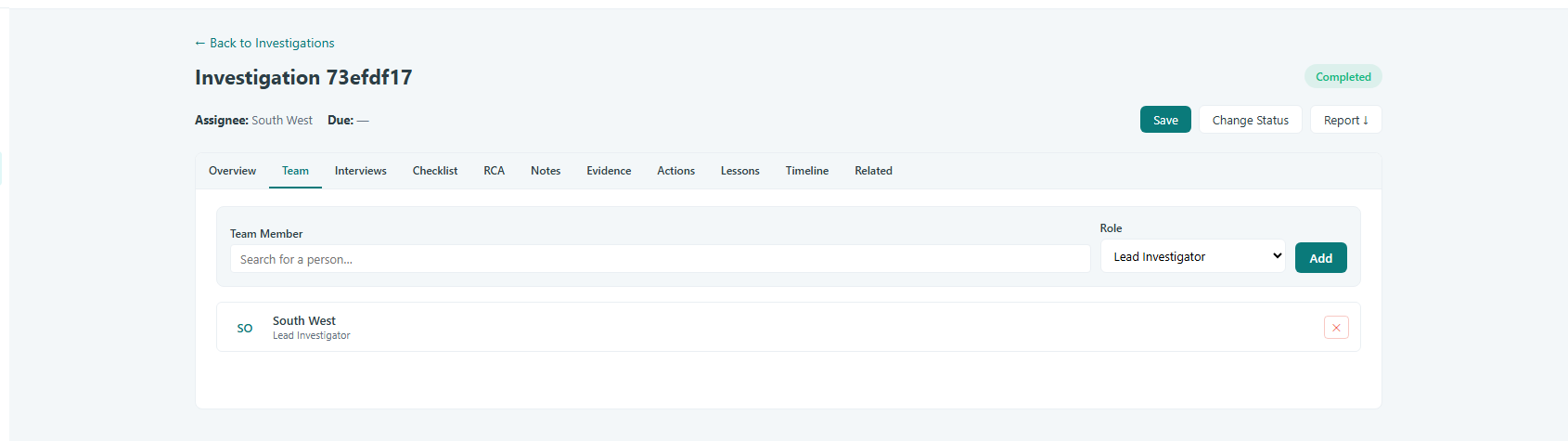
Caption: On the investigation detail page, go to the Team area.
Assign the lead investigator
Set the Lead Investigator for the investigation. This is the member who owns the case and appears at the top of the investigation record as the point of accountability.
Add team members and define their roles
Add the other people who will work on the investigation and give each one a role. Choose the role that matches what the person will do, such as Subject Matter Expert, Witness Interviewer, or Evidence Collector. Defining a clear role for every member makes it obvious who is responsible for each part of the work.
Review the team
Confirm the roster before moving on. Each member's assignment records both the investigation and the role they hold, so team members can see the lead investigator and their own role, and the investigation reflects the full team working the case.
Conclusion
Managing the investigation team in Safety App comes down to naming a lead investigator, adding the right members, and giving each person a clear role. A well-defined team keeps responsibility visible across the investigation and ensures everyone knows exactly what part of the case they own.