





Summary
Once participants have completed the initial assessment, you assign the training that closes their gaps. Assign Training moves the campaign from the assessment phase into the training phase, enrolling eligible participants in the learning path or plan you chose when you built the campaign.
Introduction
Assigning training is a deliberate step, not something that happens on its own when the assessment closes. You decide when to pull the trigger, which matters because assigning too early skips the people who have not finished yet.
This article is for the administrators and program owners running a campaign. It assumes the campaign has launched and at least some participants have completed the initial assessment.
Key Concepts
- Eligible: A participant who has completed the initial assessment and can therefore be assigned training.
- Skipped: A participant who has not completed the assessment at the moment you assign, and who is passed over.
- Late finishers: Participants who complete the assessment after training was already assigned.
- Notify at % completion: A threshold that raises a reminder banner on the campaign once enough participants have finished, so you know it is a sensible moment to assign.
- Phase: The campaign's position in its lifecycle, moving from Launched to Training Assigned, then to Reassessment Assigned and Done.
Steps to Follow
Accessing the training assignment
Open Campaigns in the left sidebar and select your campaign. The Dashboard tab carries the campaign's schedule, its participants, and the training controls.
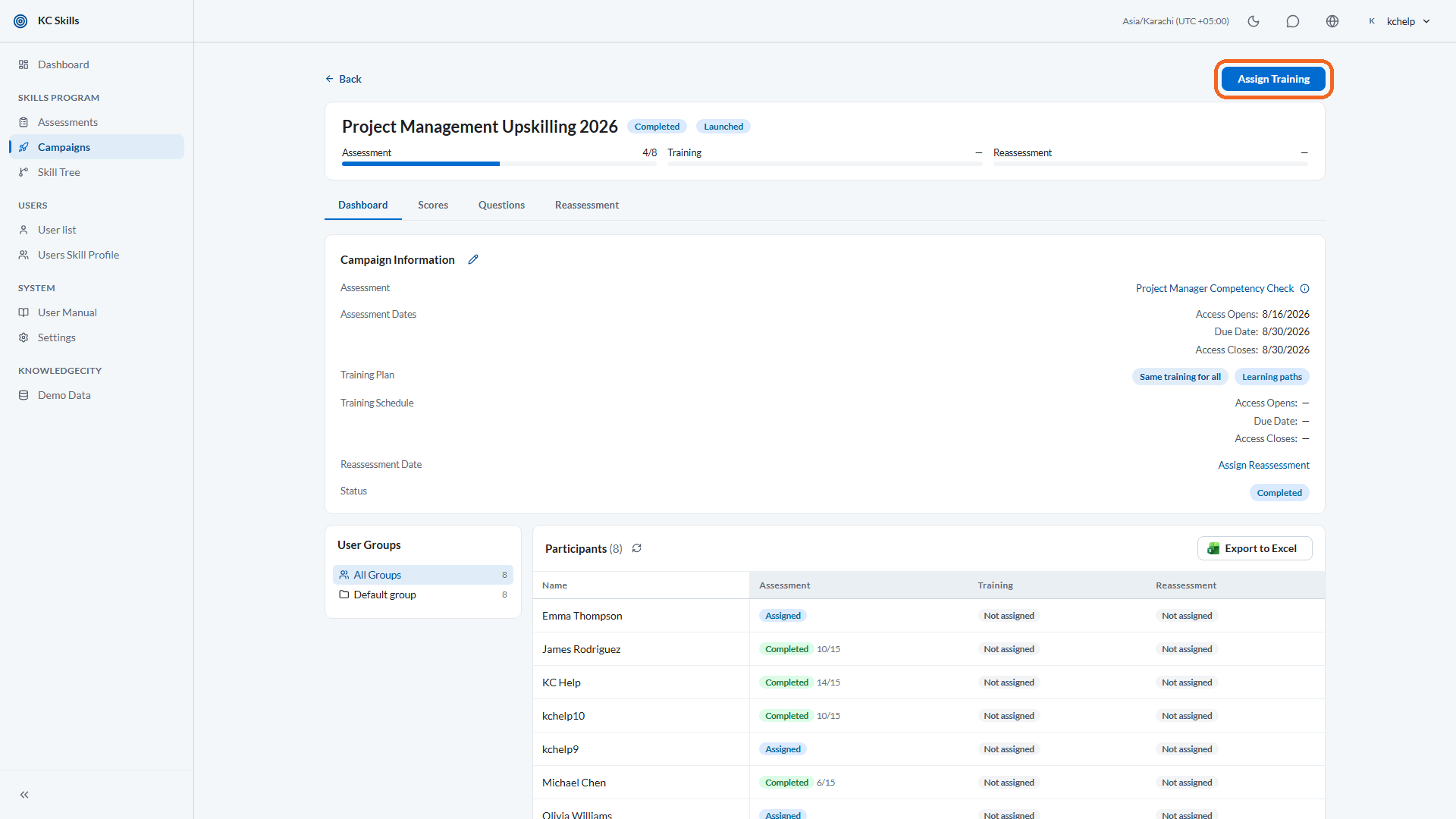
Caption: Open Campaigns in the left sidebar and select your campaign.
Step 1: Wait for enough participants to finish
Training can only reach people who have completed the initial assessment. Everyone else is skipped, so timing decides how much of your audience is covered.
Set Notify at % completion to the share of participants you want to wait for. When that percentage complete the initial assessment, a notification banner appears on the campaign dashboard reminding you to assign training.
Note: If nobody has completed the assessment yet, KC Skills tells you that no participants are eligible for training and that they must complete the assessment first. That is a timing message, not an error.
Step 2: Review who is about to be affected
When training is ready, KC Skills states that training is ready to assign and previews the outcome before anything happens. The preview tells you how many participants will be assigned training, and how many have not completed the assessment and will be skipped.
Read both numbers. The second one is the cost of assigning now, and it is the number to weigh against waiting longer.
Step 3: Assign the training
Select Assign Training, then Confirm and Assign Training on the summary that follows.
What each participant receives depends on the training plan set when the campaign was created:
- Same for All enrolls everyone in the same learning path.
- Level Based enrolls each participant in the path matching their score range.
- Individualized generates a per-person plan from their own skill gaps. Where the campaign requires approval, those plans wait in the Individualized Plan tab for your decision rather than going out immediately.
The campaign phase moves to Training Assigned.
Step 4: Handle the late finishers
Participants who complete the assessment after you assigned training are flagged as late finishers. KC Skills tells you how many there are, so they do not disappear quietly.
Assign again to pick them up once a meaningful number have accumulated. Waiting for a batch is usually better than assigning repeatedly for one person at a time.
Step 5: Retry anything that failed
If an assignment does not go through for some participants, KC Skills flags the failure and offers a retry rather than leaving it silent. Retry from the same screen, and check the participant list afterward to confirm the enrollment landed.
Note: The training section of the campaign is locked once training has been assigned. Decide the learning path and the training dates before this step, because you cannot rework them afterward.
Conclusion
Assigning training is the hinge between measuring gaps and closing them. Use the completion threshold to pick your moment, read the preview so you know who is being skipped, assign, then come back for the late finishers. Where the plan is individualized, the plans still need approving before they reach learners.