





Summary
Below your assessments in My Skills is a running record of the skills you have been measured on. Each one shows the level you demonstrated, the level you are aiming for, and when it was last evaluated. This article covers reading that record and what it is used for.
Introduction
An assessment result belongs to one sitting. Your skill levels are the longer-lived picture: they carry across assessments and reflect the most recent measurement of each skill.
This is the view to check when you want to know where you stand overall rather than how one quiz went. It is also what your organization draws on when deciding what training to offer you.
Key Concepts
- My Level: The proficiency level you have been measured at for a skill.
- Target: The level the assessment expects for that skill.
- Gap: The distance between My Level and Target. Closing gaps is what any assigned training is aiming at.
- Category: The grouping a skill belongs to, used to filter the list.
- Last evaluated on: The date that skill was most recently measured.
Steps to Follow
Finding your skills
Open My Skills in your learning portal. Below the assessment cards is your skills area, listing the skills you have been measured on.
Until you have completed an assessment it reads No skills evaluated yet, and tells you to complete a skill assessment to start tracking your skills here. Skills appear once you have a scored result.
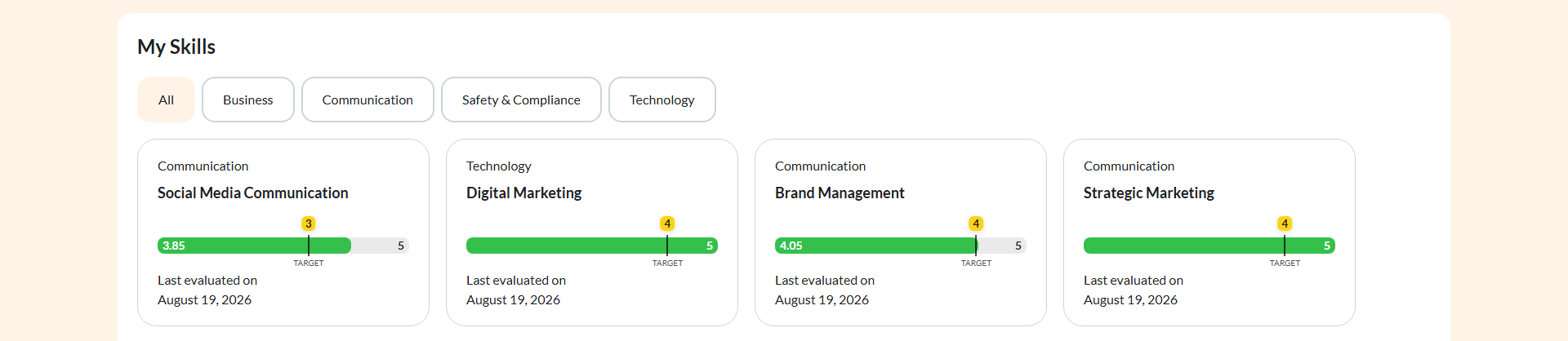
Caption: Open My Skills in your learning portal.
Step 1: Read a skill
Each skill shows three things:
- My Level: what you demonstrated.
- Target: what the assessment is asking for.
- Last evaluated on: when it was last measured, or Assessed today if it was measured today.
Read My Level against Target rather than on its own. A level that looks modest may already be at target for that skill, and a level that looks respectable may still sit below what the role expects.
Step 2: Filter by category
Skills are grouped by Category. Select a category to narrow the list, or All to see everything.
On a long list this is the fastest way to focus. If your training has been aimed at one area, filtering to that category shows you whether the work is moving the levels that were meant to move.
Step 3: Focus on the gaps
The skills worth your attention are the ones where My Level sits below Target. That distance is what any recommended learning is meant to close.
Skills already at or above target need nothing from you right now. Reading the list this way turns a wall of levels into a short list of things to work on.
Step 4: Check how current a skill is
Last evaluated on tells you how much to trust a level. A skill measured recently reflects where you are now, while one measured some time ago may be out of date if you have learned a lot since.
If an old level no longer looks right, that is worth raising with whoever runs your training. The way it gets refreshed is by being assessed again.
Step 5: Expect your levels to drive what comes next
Your levels are not just for you to read. Where gaps exist, your organization may assign courses or a learning path aimed at those specific skills, and may later reassess you on them to check whether the training worked.
Revisit this view after finishing assigned training. Once you have been reassessed, the levels update to reflect what you demonstrated the second time.
Conclusion
Your skills area is the running record behind the individual results: what level you are at, what level is expected, and when each was last measured. Read My Level against Target, use the category filter to focus, and treat the gaps as your list of what to work on next.